This article hasn't been updated for over 5 years. The information below may be obsolete.
Basic VxVM Commands
Published |
10 minute read | 4048 views |
Storage
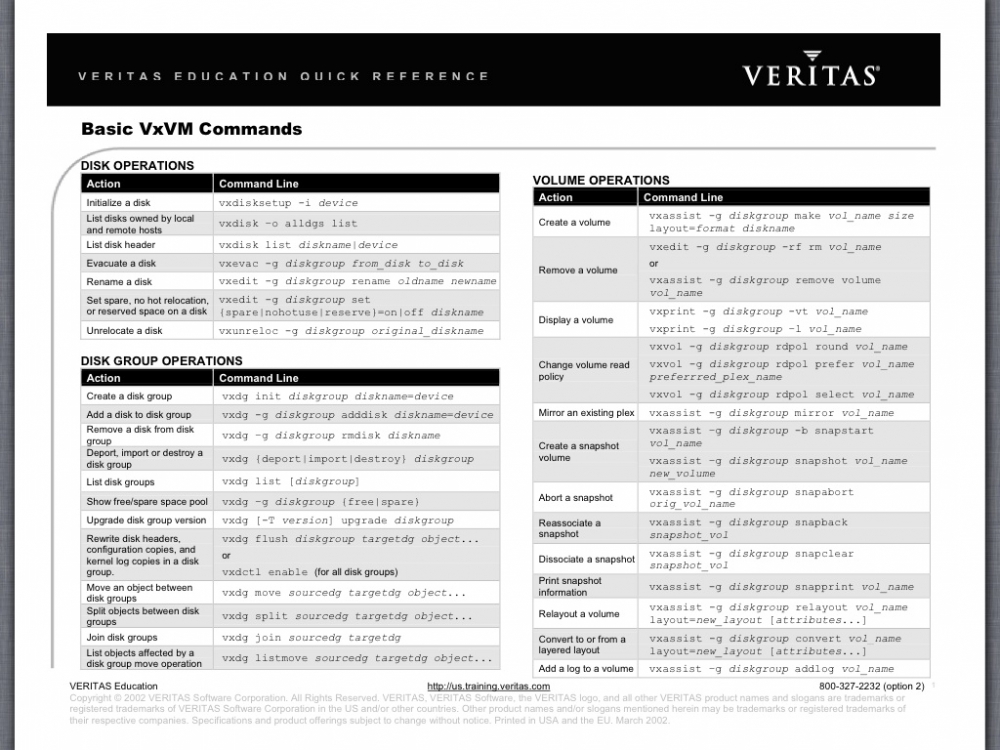
Obtaining information about objects in VxVM
|
Command
|
Description
|
|---|
|
vxdctl license [init]
|
List licensed features of VxVM.
The init parameter is required when a license has been added or removed from the host for the new license to take effect.
|
|
vxdisk [-g diskgroup] list [diskname]
|
Lists disks under control of VxVM.
Example:
# vxdisk -g mydg list
|
|
vxdg list [diskgroup]
|
Lists information about disk groups.
Example:
# vxdg list mydg
|
|
vxdg -s list
|
Lists information about shared disk groups.
Example:
# vxdg -s list
|
|
vxdisk -o alldgs list
|
Lists all diskgroups on the disks. The imported diskgroups are shown as standard, and additionally all other diskgroups are listed in single quotes.
|
|
vxinfo [-g diskgroup] [volume ...]
|
Displays information about the accessibility and usability of volumes.
See the Veritas Storage Foundation and High Availability Troubleshooting Guide.
Example:
# vxinfo -g mydg myvol1 \
  myvol2
|
|
vxprint -hrt [-g diskgroup] [object ...]
|
Prints single-line information about objects in VxVM.
Example:
# vxprint -g mydg myvol1 \
  myvol2
|
|
vxlist
|
Provides a consolidated view of the SF configuration, including information from Veritas Volume Manager (VxVM) and Veritas File System (VxFS).
See vxlist(1m) manual page.
|
|
vxprint -st [-g diskgroup] [subdisk ...]
|
Displays information about subdisks.
Example:
# vxprint -st -g mydg
|
|
vxprint -pt [-g diskgroup] [plex ...]
|
Displays information about plexes.
Example:
# vxprint -pt -g mydg
|
Administering disks
|
Command
|
Description
|
|---|
|
vxdisk [-o full] reclaim {disk|enclosure|diskgroup}...
|
Performs storage reclamation on thin provision LUNs.
|
|
vxdiskadm
|
Administers disks in VxVM using a menu-based interface.
|
|
vxdiskadd [devicename ...]
|
Adds a disk specified by device name.
Example:
# vxdiskadd hdisk1
|
|
vxedit [-g diskgroup] rename
olddisk newdisk
|
Renames a disk under control of VxVM.
Example:
# vxedit -g mydg rename mydg03 mydg02
|
|
vxedit [-g diskgroup] set reserve=on|off diskname
|
Sets aside/does not set aside a disk from use in a disk group.
Examples:
# vxedit -g mydg set reserve=on mydg02
# vxedit -g mydg set
  reserve=off mydg02
|
|
vxedit [-g diskgroup] set nohotuse=on|off diskname
|
Does not/does allow free space on a disk to be used for hot-relocation.
Examples:
# vxedit -g mydg set \
  nohotuse=on mydg03
# vxedit -g mydg set \
  nohotuse=off mydg03
|
|
vxedit [-g diskgroup] set
spare=on|off diskname<
|
Adds/removes a disk from the pool of hot-relocation spares.
Examples:
# vxedit -g mydg set \
  spare=on mydg04
# vxedit -g mydg set \
  spare=off mydg04
|
|
vxdisk offline devicename
|
Takes a disk offline.
Example:
# vxdisk offline hdisk1
|
|
vxdg -g diskgroup rmdisk diskname
|
Removes a disk from its disk group.
Example:
# vxdg -g mydg rmdisk mydg02
|
|
vxdiskunsetup devicename
|
Removes a disk from control of VxVM.
Example:
# vxdiskunsetup hdisk3
|
Creating and administering disk groups
|
Command
|
Description
|
|---|
|
vxdg [-s] init diskgroup
[diskname=]devicename
|
Creates a disk group using a pre-initialized disk.
Example:
# vxdg init mydg \
  mydg01=hdisk1
|
|
vxdg -g diskgroup listssbinfo
|
Reports conflicting configuration information.
Example:
# vxdg -g mydg listssbinfo
|
|
vxdg [-n newname] deport diskgroup
|
Deports a disk group and optionally renames it.
Example:
# vxdg -n newdg deport mydg
|
|
vxdg [-n newname] import diskgroup
|
Imports a disk group and optionally renames it.
Example:
# vxdg -n newdg import mydg
|
|
vxdg [-n newname] -s import diskgroup
|
Imports a disk group as shared by a cluster, and optionally renames it.
Example:
# vxdg -n newsdg -s import \
  mysdg
|
|
vxdg [-o expand] listmove sourcedg
targetdg object ...
|
Lists the objects potentially affected by moving a disk group.
Example:
# vxdg -o expand listmove \
  mydg newdg myvol1
|
|
vxdg [-o expand] move sourcedg
targetdg object ...<
|
Moves objects between disk groups.
Example:
# vxdg -o expand move mydg \
  newdg myvol1
|
|
vxdg [-o expand] split sourcedg
targetdg object ...
|
Splits a disk group and moves the specified objects into the target disk group.
Example:
# vxdg -o expand split mydg \
  newdg myvol2 myvol3
|
|
vxdg join sourcedg targetdg
|
Joins two disk groups.
Example:
# vxdg join newdg mydg
|
|
vxdg -g diskgroup set
activation=ew|ro|sr|sw|off
|
Sets the activation mode of a shared disk group in a cluster.
Example:
# vxdg -g mysdg set \
 activation=sw
|
|
vxrecover -g diskgroup -sb
|
Starts all volumes in an imported disk group.
Example:
# vxrecover -g mydg -sb
|
|
vxdg destroy diskgroup
|
Destroys a disk group and releases its disks.
Example:
# vxdg destroy mydg
|
Creating and administering subdisks
|
Command
|
Description
|
|---|
|
vxmake [-g diskgroup] sd subdisk
diskname,offset,length
|
Creates a subdisk.
Example:
# vxmake -g mydg sd \
 mydg02-01 mydg02,0,8000
|
|
vxsd [-g diskgroup] assoc plex
subdisk...
|
Associates subdisks with an existing plex.
Example:
# vxsd -g mydg assoc home-1 \
  mydg02-01 mydg02-00 \
  mydg02-01
|
|
vxsd [-g diskgroup] assoc plex
subdisk1:0 ... subdiskM:N-1
|
Adds subdisks to the ends of the columns in a striped or RAID-5 volume.
Example:
# vxsd -g mydg assoc \
  vol01-01 mydg10-01:0 \
  mydg11-01:1 mydg12-01:2
|
|
vxsd [-g diskgroup] mv oldsubdisk
newsubdisk ...
|
Replaces a subdisk.
Example:
# vxsd -g mydg mv mydg01-01 \
  mydg02-01
|
|
vxsd [-g diskgroup] -s size split
subdisk sd1 sd2
|
Splits a subdisk in two.
Example:
# vxsd -g mydg -s 1000m \
  split mydg03-02 mydg03-02 \
  mydg03-03
|
|
vxsd [-g diskgroup] join
sd1 sd2 ... subdisk
|
Joins two or more subdisks.
Example:
# vxsd -g mydg join \
  mydg03-02 mydg03-03 \
  mydg03-02
|
|
vxassist [-g diskgroup] move
volume \!olddisk newdisk
|
Relocates subdisks in a volume between disks.
Example:
# vxassist -g mydg move \
  myvol \!mydg02 mydg05
Note: The ! character is a special character in some shells. This example shows how to escape it in a bash shell.
|
|
vxunreloc [-g diskgroup] original_disk
|
Relocates subdisks to their original disks.
Example:
# vxunreloc -g mydg mydg01
|
|
vxsd [-g diskgroup] dis subdisk
|
Dissociates a subdisk from a plex.
Example:
# vxsd -g mydg dis mydg02-01
|
|
vxedit [-g diskgroup] rm subdisk
|
Removes a subdisk.
Example:
# vxedit -g mydg rm mydg02-01
|
|
vxsd [-g diskgroup] -o rm dis subdisk
|
Dissociates and removes a subdisk from a plex.
Example:
# vxsd -g mydg -o rm dis \
  mydg02-01
|
Creating and administering plexes
|
Command
|
Description
|
|---|
|
vxmake [-g diskgroup] plex plex
sd=subdisk1[,subdisk2,...]
|
Creates a concatenated plex.
Example:
# vxmake -g mydg plex \
  vol01-02 \
  sd=mydg02-01,mydg02-02
|
|
vxmake [-g diskgroup] plex plex
layout=stripe|raid5 stwidth=W \
ncolumn=N \
sd=subdisk1[,subdisk2,...]
|
Creates a striped or RAID-5 plex.
Example:
# vxmake -g mydg plex pl-01 \
  layout=stripe stwidth=32 \
  ncolumn=2 \
  sd=mydg01-01,mydg02-01
|
|
vxplex [-g diskgroup] att volume plex
|
Attaches a plex to an existing volume.
Example:
# vxplex -g mydg att vol01 \
  vol01-02
|
|
vxplex [-g diskgroup] det plex
|
Detaches a plex.
Example:
# vxplex -g mydg det vol01-02
|
|
vxmend [-g diskgroup] off plex
|
Takes a plex offline for maintenance.
Example:
# vxmend -g mydg off vol02-02
|
|
vxmend [-g diskgroup] on plex
|
Re-enables a plex for use.
Example:
# vxmend -g mydg on vol02-02
|
|
vxplex [-g diskgroup] mv oldplex
newplex
|
Replaces a plex.
Example:
# vxplex -g mydg mv \
  vol02-02 vol02-03
|
|
vxplex [-g diskgroup] cp volume
newplex
|
Copies a volume onto a plex.
Example:
# vxplex -g mydg cp vol02 \
  vol03-01
|
|
vxmend [-g diskgroup] fix clean plex
|
Sets the state of a plex in an unstartable volume to CLEAN.
Example:
# vxmend -g mydg fix clean \
  vol02-02
|
|
vxplex [-g diskgroup] -o rm dis plex
|
Dissociates and removes a plex from a volume.
Example:
# vxplex -g mydg -o rm dis \
  vol03-01
|
Creating volumes
|
Command
|
Description
|
|---|
|
vxassist [-g diskgroup] maxsize
layout=layout [attributes]
|
Displays the maximum size of volume that can be created.
Example:
# vxassist -g mydg maxsize \
  layout=raid5 nlog=2
|
|
vxassist -b [-g diskgroup] make
volume length [layout=layout] \
[attributes]
|
Creates a volume.
Example:
# vxassist -b -g mydg make \
  myvol 20g layout=concat \
  mydg01 mydg02
|
|
vxassist -b [-g diskgroup] make
volume length layout=mirror \
[nmirror=N][attributes]
|
Creates a mirrored volume.
Example:
# vxassist -b -g mydg make \
  mymvol 20g layout=mirror \
  nmirror=2
|
|
vxassist -b [-g diskgroup] make
volume length layout=layout \
exclusive=on [attributes]
|
Creates a volume that may be opened exclusively by a single node in a cluster.
Example:
# vxassist -b -g mysdg make \
  mysmvol 20g layout=mirror \
  exclusive=on
|
|
vxassist -b [-g diskgroup] make
volume length layout={stripe|raid5} \
[stripeunit=W] [ncol=N] \
[attributes]
|
Creates a striped or RAID-5 volume.
Example:
# vxassist -b -g mydg make \
  mysvol 20g layout=stripe \
  stripeunit=32 ncol=4
|
|
vxassist -b [-g diskgroup] make
volume length layout=mirror \
mirror=ctlr [attributes]
|
Creates a volume with mirrored data plexes on separate controllers.
Example:
# vxassist -b -g mydg make \
  mymcvol 20g layout=mirror \
  mirror=ctlr
|
|
vxmake -b [-g diskgroup]
-Uusage_type vol volume \
[len=length] plex=plex,...
|
Creates a volume from existing plexes.
Example:
# vxmake -g mydg -Uraid5 \
  vol r5vol \
  plex=raidplex,raidlog1,\
  raidlog2
|
|
vxvol [-g diskgroup] start volume
|
Initializes and starts a volume for use.
Example:
# vxvol -g mydg start r5vol
|
|
vxvol [-g
diskgroup] init zero
volume
|
Initializes and zeros out a volume for use.
Example:
# vxvol -g mydg init zero \
  myvol
|
Administering volumes
|
Command
|
Description
|
|---|
vxassist [-g diskgroup] mirror \
volume [attributes]
|
Adds a mirror to a volume.
Example:
# vxassist -g mydg mirror \
  myvol mydg10
|
vxassist [-g diskgroup] remove \
mirror volume [attributes]
|
Removes a mirror from a volume.
Example:
# vxassist -g mydg remove \
  mirror myvol \!mydg11
|
Note: The ! character is a special character in some shells. This example shows how to escape it in a bash shell.
|
|
vxassist [-g diskgroup] \
{growto|growby} volume length
|
Grows a volume to a specified size or by a specified amount.
Example:
# vxassist -g mydg growby \
  myvol 10g
|
vxassist [-g diskgroup] \
{shrinkto|shrinkby} volume length
|
Shrinks a volume to a specified size or by a specified amount.
Example:
# vxassist -g mydg shrinkto \
  myvol 20g
|
vxresize -b -F vxfs [-g diskgroup] \
volume length diskname ...
|
Resizes a volume and the underlying Veritas File System.
Example:
# vxresize -b -F vxfs \
  -g mydg myvol 20g mydg10 \
  mydg11
|
vxsnap [-g diskgroup] prepare volume \
[drl=on|sequential|off]
|
Prepares a volume for instant snapshots and for DRL logging.
Example:
# vxsnap -g mydg prepare \
  myvol drl=on
|
vxsnap [-g diskgroup] make \
source=volume\
/newvol=snapvol\
[/nmirror=number]
|
Takes a full-sized instant snapshot of a volume by breaking off plexes of the original volume.
Example:
# vxsnap -g mydg make \
  source=myvol/\
  newvol=mysnpvol/\
  nmirror=2
|
vxsnap [-g diskgroup] make \
source=volume/snapvol=snapvol
|
Takes a full-sized instant snapshot of a volume using a prepared empty volume.
Example:
# vxsnap -g mydg make \
  source=myvol/snapvol=snpvol
|
vxmake [-g diskgroup] cache \
cache_object cachevolname=volume \
[regionsize=size]
|
Creates a cache object for use by space-optimized instant snapshots.
A cache volume must have already been created. After creating the cache object, enable the cache object with the vxcache start command.
For example:
# vxassist -g mydg make \
  cvol 1g layout=mirror \
  init=active mydg16 mydg17
# vxmake -g mydg cache cobj \
  cachevolname=cvol
# vxcache -g mydg start cobj
|
vxsnap [-g diskgroup] make \
source=volume/newvol=snapvol\
/cache=cache_object
|
Takes a space-optimized instant snapshot of a volume.
Example:
# vxsnap -g mydg make \
  source=myvol/\
  newvol=mysosvol/\
  cache=cobj
|
vxsnap [-g diskgroup] refresh snapshot
|
Refreshes a snapshot from its original volume.
Example:
# vxsnap -g mydg refresh \
  mysnpvol
|
vxsnap [-g diskgroup] dis snapshot
|
Turns a snapshot into an independent volume.
Example:
# vxsnap -g mydg dis mysnpvol
|
vxsnap [-g diskgroup] unprepare \
volume
|
Removes support for instant snapshots and DRL logging from a volume.
Example:
# vxsnap -g mydg unprepare \
  myvol
|
vxassist [-g diskgroup] relayout \
volume [layout=layout] \
[relayout_options]
|
Performs online relayout of a volume.
Example:
# vxassist -g mydg relayout \
  vol2 layout=stripe
|
vxassist [-g diskgroup] relayout \
volume layout=raid5 \
stripeunit=W \
ncol=N
|
Relays out a volume as a RAID-5 volume with stripe width W and N columns.
Example:
# vxassist -g mydg relayout \
  vol3 layout=raid5 \
  stripeunit=16 ncol=4
|
vxrelayout [-g diskgroup] -o bg \
reverse volume
|
Reverses the direction of a paused volume relayout.
Example:
# vxrelayout -g mydg -o bg \
  reverse vol3
|
vxassist [-g diskgroup] convert \
volume [layout=layout] \
[convert_options]
|
Converts between a layered volume and a non-layered volume layout.
Example:
# vxassist -g mydg convert \
  vol3 layout=stripe-mirror
|
vxassist [-g diskgroup] remove \
volume volume
|
Removes a volume.
Example:
# vxassist -g mydg remove \
  myvol
|
Monitoring and controlling tasks
|
Command
|
Description
|
|---|
|
command [-g diskgroup] -t tasktag
[options] [arguments]
|
Specifies a task tag to a VxVM command.
Example:
# vxrecover -g mydg \
  -t mytask -b mydg05
|
vxtask [-h] [-g diskgroup] list
|
Lists tasks running on a system.
Example:
# vxtask -h -g mydg list
|
vxtask monitor task
|
Monitors the progress of a task.
Example:
# vxtask monitor mytask
|
vxtask pause task
|
Suspends operation of a task.
Example:
# vxtask pause mytask
|
vxtask -p [-g diskgroup] list
|
Lists all paused tasks.
Example:
# vxtask -p -g mydg list
|
vxtask resume task
|
Resumes a paused task.
Example:
# vxtask resume mytask
|
vxtask abort task
|
Cancels a task and attempts to reverse its effects.
Example:
# vxtask abort mytask
|
