
This article hasn't been updated for over 5 years. The information below may be obsolete.
Battery replacement on Sun StorEdge A1000 array
A simple post providing the steps necessary to health check and if necessary replace the batteries in a Sun StorEdge™ A1000 array.
- Firstly, use the
healthckcommand to perform a health check on the raid modules to see if any of the batteries need replacing:root@solaris# healthck -a tstary1: Battery Alert tstary2: Battery Alert healthck succeeded!
From the above output we see a "Battery Alert" is listed against both array devices. - List the array devices:
root@solaris# lad
c1t3d0 1T07616314 LUNS: 0
c2t3d0 1T22096148 LUNS: 0
From the about output, our devices are listed as c1t3d0 and c2t3d0 - Use the
raidutilto get the battery age. For example:root@solaris# raidutil -c c1t3d0 -B LUNs found on c1t3d0. LUN 0 RAID 5 346928 MB Battery age is between 630 days and 720 days.
From the about output, we can see that the battery age is greater than the 2 year shelf life, and therefore need replacing. - To perform the battery replacement, follow the following 5 steps:
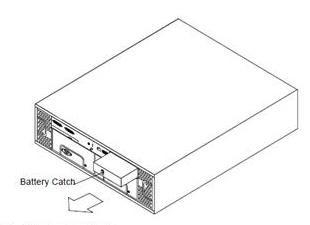
- Turn OFF the power for the A1000
- Push down the catch on the battery
- Pull the battery out
- Slide the new battery into the battery port
- Turn ON the power for the A1000
- Turn OFF the power for the A1000
- Finally, reset battery state to zero. For example:
root@solaris# raidutil -c c1t3d0 -R